Showing posts with label CCR file. Show all posts

Tuesday, November 20, 2012

CCR file for the Holiday Tags


I've had numerous requests for info on how I changed the Holiday Card file into the tags, so here you go: I placed the image on the mat in CCR and used the Hide feature to hide the card outline. I used a tag from George and Basic Shapes and made it the size I wanted {2.5 inches wide and 3.5 inches tall in this case}. I then moved the image from the Holiday Card over onto the tag and sized it to fit. Do not Weld these two images. I cut the tag with the images in red vinyl with settings of 3 for blade depth, 3 {med} for pressure and CCR controlled the speed. I cut a plain tag in white.

I used a piece of transfer tape that was bigger than the entire image and burnished it across the entire image. I flipped the vinyl/tape over {face down} and started peeling back the paper backing. I only took of the cut out image and left the little pieces on the paper backing {this did take a little fiddling to keep them stuck in place on the backing}. Once I had the tag image completely off, I aligned it with the white tag and burnished them together. Then, I took the piece of transfer tape and laid it over the remaining pieces on the paper backing, burnished it and picked up all those pieces onto the transfer tape and placed it onto the glass candy jars {which were only $1 at Dollar Tree}. It really was rather easy!


Thursday, November 15, 2012

Crayon Style Box

A member of the Cricut MB was needing a small crayon style box and she couldn't get Design Studio or CCR to work for her file, so I created this box for her. It's 2.5 inches wide, a smidge over 3.5 inches tall and 0.5 inches deep. Of course, you can easily proportionally resize CCR files.


Here's a screenshot showing where to score and snip the flaps.


Monday, November 12, 2012

Christmas Candy Purses

Since the Christmas candy was still out from the Candy Dispenser Boxes, I decided to cut a couple of candy purses {previously seen HEREHERE  with tutorial and HERE on my blog} and decorate them for Christmas.


These are really cute and really easy to make and a good way to use up scraps of paper! Thanks for stopping by!

Sunday, August 19, 2012

Ladybug CCR file

Yesterday, a new Cricut user was needing a ladybug file. So, I created this one in CCR using the free Craft Room Basics image set.


Sunday, July 22, 2012

Hippie Girl Paper Doll


A while back, I made this Hippie Girl for a card for a 70's themed party. This is a photo of the "test" doll I made and a screenshot from CCR. I used Teen Scene and Groovy Times Cricut carts. In CCR, I was able to size the dress from Groovy Times to fit the doll body from Teen Scene. The go-go boots are a pair of tights and a shoe, from Teen Scene, welded together. I hand cut the tights at the knee to make boots.


Someone asked for the .ccr file, so here it is:
https://www.box.com/s/dae5fb5bda46d1f4319d

Sunday, April 29, 2012

Blog~iversary Celebration!


Just last April, I started posting on my blog. Who knew it would be so much fun? OK, I have to admit that my friend, Narelle, kept telling me to start a blog and she even did most of the work to get mine started. I just had to make stuff!

So to celebrate the past year and to thank those that follow my blog, I'm having a Blog~iversary Celebration! I'll be giving one lucky follower their choice of any cart available through cricutrewards.com including the Circle Exclusive carts!

For your chance to win, follow my blog and comment on this post! Want a second chance to win? Pin one of my projects to your Pinterest board and come back and post the link! How about a third chance to win? Comment on one of my projects that are posted {mostly in the Other Crafts forum} on the Cricut MB and come back and post the link! If someone else already posted on a project thread within the past 24 hours, find another project to post on for it to count. And, don't post on the same project more than once.

And, to make it crazier. . .you can post everyday until May 5! Just make sure you only post one general comment on this post, one project pinned and one comment on the Cricut MB one one of my projects posted there in a 24 hour time frame. I will be looking at the dates based on Eastern Time, so adjust for your time zone so your entry isn't disqualified. That means you could post 3 times each day for the 7 days and have 21 chances to win!

Still not crazy enough? If I should hit 600 followers before the end of the celebration, I'll pick TWO winners!

Thanks so much for all the support you have given me and good luck in the celebration! Let's get this party started!!! And, every party needs cake! So I designed this cute little cupcake stand in CCR using Craft Room Basics. Once you cut the two pieces,

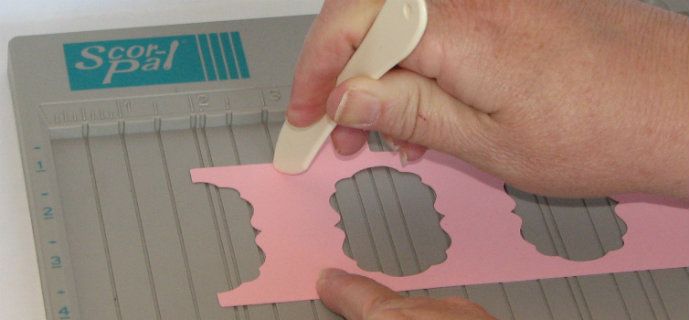
you simply score the base between the cutouts, then flip the base over and score down the middle of the cutouts and score along the top edge.
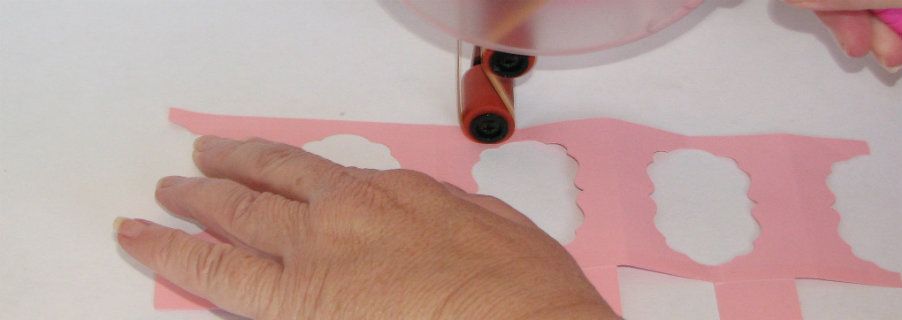
Then, accordian fold the base,
apply adhesive to the top and bottom edges and match of the folds.
Fold the tabs down along the top and apply adhesive, turn it upside down and stick it to the scalloped circle.
Flip it over and place your cupcake {or Cricut Bug} on it's stand!


Cupcake stand file for CCR:
https://www.box.com/s/fa5f60d0549470d102a9

Cupcake stand file for Gypsy {which can also be opened in DS}:
https://www.box.com/s/eda37545fa781771ce45

Saturday, April 14, 2012

Hello Kitty!

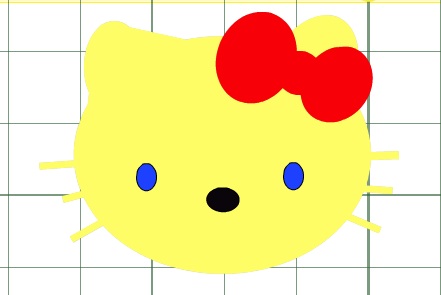
Someone on the Cricut MB requested a Hello Kitty file for a card she was making for a little girl with cancer. My heart was heavy thinking of the child and mother/father/family dealing with her illness, so I made this Hello Kitty in CCR using the free Cricut Craft Room Basics for her. I hope the card lifts the child's spirits and shows the family that others care.


Sunday, March 25, 2012

Tops for Lanterns from cricut.com


Lots of people have been impressed (and rightly so) with the paper lanterns featured on cricut.com. While there are directions for making the base of the lanterns, there are no directions for making the tops. I think that is probably because the designers made each top to fit a specific lantern. However, there were lots of requests on the Cricut message board, so I created a basic file for the square and the circle tops. You can download the file from box.com and resize it to fit your lantern. The file uses George and Basic Shapes and CCR.
http://www.box.com/s/cd207990bfba0dede24b

Sunday, March 4, 2012

A St. Patrick's Day Candy Purse

To hold all those gold coins you'll get from the Leprechauns you catch!


 I made 30 of these little purses for the Cricut Circle St. Patrick's theme Crop. They are cut from the same .ccr file as the SWARM favor purse and the Valentine candy purse.


And, yes, there's an Easter one too!

Saturday, February 11, 2012

CCR file for the Candy Purse

It appears that some people who had requested the .ccr file for the Candy Purse didn't receive it even though I emailed it. It must be a problem with your or my email provider. So, if any one wants the file, you can go to box.net and download it there. I'd love to see any Candy Purses you make!

https://www.box.com/s/4be7x177n5grqqd55kdx